
Quit smoking cigarettes with S1.4.0 - Google Play
You'll be able to see results in few seconds.
Publisher Description


Quit addiction and habits - take care of your health.
Tired of spending money on cigarettes? Are you looking for an easy way to quit smoking? The "Smokler" application can help you with this task.
Quitting is not easy and fast for everyone, so we suggest you do it slowly so that your body can easily get used to a smooth reduction in nicotine.
How the application works:
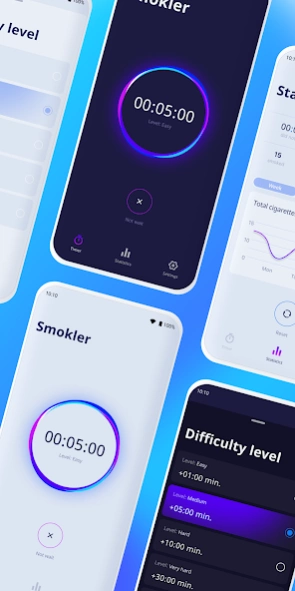
1) When you want to smoke, you enter the application
and you start the timer.
2) Wait for it to run out and you can start smoking.
3) The next time you decide to take a cigarette or
other drug-containing product, you do the same thing,
but the waiting time will increase every time.
Choose the appropriate level of difficulty that will affect the intensity of the increase in waiting time before smoking.
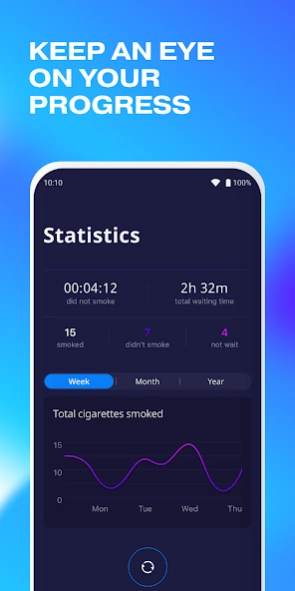
Statistics are available to track your progress:
- The number of cigarettes you have smoked at certain intervals.
- The time elapsed since the last time you smoked.
- How often have you been able to wait until the timer has expired before smoking?
- Schedule of nicotine consumption.
Quit addiction and habits with Smokler:
- Cigarettes
- Alcohol
- Drugs
- Caffeine
- Sugar Dependencies
- Snus
- Vape
- Hookah
Using our application, you can stop smoking cigarettes, or at least start smoking less!
About Quit smoking cigarettes with S
The company that develops Quit smoking cigarettes with S is ZeroBased. The latest version released by its developer is 1.4.0.
To install Quit smoking cigarettes with S on your Android device, just click the green Continue To App button above to start the installation process. The app is listed on our website since 2021-03-28 and was downloaded 0 times. We have already checked if the download link is safe, however for your own protection we recommend that you scan the downloaded app with your antivirus. Your antivirus may detect the Quit smoking cigarettes with S as malware if the download link to com.zerobased.smokler is broken.
How to install Quit smoking cigarettes with S on your Android device:
- Click on the Continue To App button on our website. This will redirect you to Google Play.
- Once the Quit smoking cigarettes with S is shown in the Google Play listing of your Android device, you can start its download and installation. Tap on the Install button located below the search bar and to the right of the app icon.
- A pop-up window with the permissions required by Quit smoking cigarettes with S will be shown. Click on Accept to continue the process.
- Quit smoking cigarettes with S will be downloaded onto your device, displaying a progress. Once the download completes, the installation will start and you'll get a notification after the installation is finished.
Program Details
System requirements
Download information
Pricing
Version History
version 1.4.0
posted on 2021-03-28
- Added "Average time between smoke breaks" to statistics.
- Added the ability to customize notifications.
- Bug fixes.
version 1.4.0
posted on 2021-03-29
- Added "Average time between smoke breaks" to statistics.
- Added the ability to customize notifications.
- Bug fixes.
Disclaimer
Official Google Play Link
We do not host Quit smoking cigarettes with S on our servers. We did not scan it for viruses, adware, spyware or other type of malware. This app is hosted by Google and passed their terms and conditions to be listed there. We recommend caution when installing it.
The Google Play link for Quit smoking cigarettes with S is provided to you by apps112.com without any warranties, representations or guarantees of any kind, so access it at your own risk.
If you have questions regarding this particular app contact the publisher directly. For questions about the functionalities of apps112.com contact us.
